Mastering SQL Window Functions
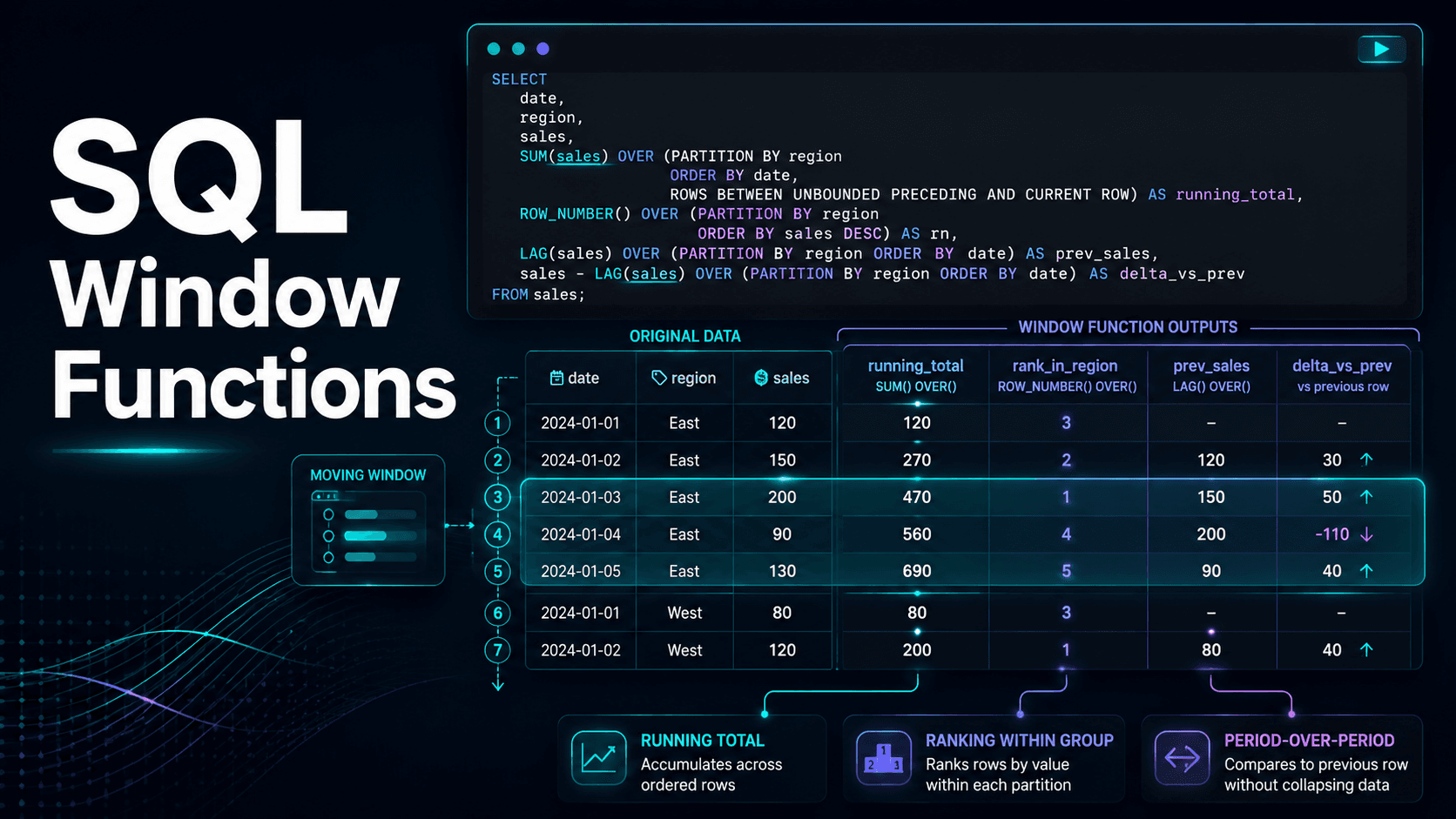
SQL window functions explained with runnable examples: running totals, ranking with row_number, rank, and dense_rank, and period-over-period comparisons with lag and lead.
Why window functions matter
Window functions let you compute across a set of rows related to the current row without collapsing them into a group. A regular group by gives you one row per group; a window function gives you back every original row, each annotated with a value computed over some window around it. That's what makes running totals, rankings, and period-over-period math possible in a single, readable query.
Callout: If you find yourself self-joining a table to itself to compare rows, a window function is almost always the better tool — it's faster, and it reads top to bottom instead of requiring you to trace two aliased copies of the same table.
The anatomy of OVER()
Every window function shares the same three-part structure:
function_name() over (
  partition by ...   -- optional: restart the calculation per group
  order by ...        -- required for ranking and running totals
  rows between ...     -- optional: the "frame" — how many rows around the current one
)
partition by resets the window per group (per customer, per category, whatever you're slicing by). order by determines the sequence the window moves through. The frame clause is the part people skip and then get confused by — it controls exactly which rows are included in the calculation for each row.
A running total
select
  order_date,
  revenue,
  sum(revenue) over (
    order by order_date
    rows between unbounded preceding and current row
  ) as running_revenue
from daily_sales
order by order_date;
rows between unbounded preceding and current row is the frame that makes this a running total instead of a grand total — it says "everything from the start of the partition up to this row, no further." Drop the frame clause entirely and most databases default to this same behavior when order by is present, but writing it out explicitly is worth the extra line: it documents your intent, and it's required the moment you want anything other than the default (a trailing moving average, for instance).
Ranking within groups — and the difference that actually matters
select
  category,
  product,
  revenue,
  row_number() over (partition by category order by revenue desc) as row_num,
  rank()       over (partition by category order by revenue desc) as rank,
  dense_rank() over (partition by category order by revenue desc) as dense_rank
from product_sales;| Function | Behavior on a tie | Use case |
|---|---|---|
row_number() | Arbitrarily breaks the tie, no duplicate numbers | Deduplication, "pick exactly one row per group" |
rank() | Ties share a rank, then skips the next number (1, 1, 3) | Leaderboards where a skipped rank communicates "two products tied for #1" |
dense_rank() | Ties share a rank, no skip (1, 1, 2) | "How many distinct revenue tiers exist" style questions |
Picking the wrong one is the single most common window-function mistake — row_number() for deduplication is usually correct, but reaching for it in a leaderboard silently hides genuine ties.
Period-over-period comparison with lag and lead
select
  order_month,
  revenue,
  lag(revenue) over (order by order_month) as prev_month_revenue,
  round(
    100.0 * (revenue - lag(revenue) over (order by order_month))
    / lag(revenue) over (order by order_month), 1
  ) as mom_growth_pct
from monthly_revenue
order by order_month;
lag() reaches backward one row (the previous month); lead() reaches forward. This is the query that used to require a self-join — joining monthly_revenue to itself on month = month - 1 — and it's noticeably easier to get wrong that way than with a window function.
A moving average
Combine a frame clause with avg() for a trailing N-period average — useful for smoothing out noisy daily data:
select
  order_date,
  revenue,
  avg(revenue) over (
    order by order_date
    rows between 6 preceding and current row
  ) as trailing_7day_avg
from daily_sales
order by order_date;
Common mistakes
- Forgetting
order byin the frame for a ranking function — without it, the ranking is undefined (some engines error, others silently return a meaningless order). - Using
row_number()where ties should be visible — check whether your business question actually cares about ties before picking the function. - Filtering on a window function in the
whereclause — window functions are computed afterwhere, so this fails. Wrap the query in a CTE or subquery and filter in the outer query instead.
Key takeaways
- Window functions replace the self-join pattern for anything "compared to another row."
- The frame clause (
rows between ...) is what turns a plain aggregate into a running or moving calculation. row_number(),rank(), anddense_rank()are not interchangeable — the difference only shows up on ties, which is exactly when it matters most.
If you want to see these patterns applied to a real dataset rather than a toy example, the Retail Sales Performance Dashboard project walks through ranking products by revenue end to end.
Enjoyed this post?
Get new analytics tutorials in your inbox.
Related articles
Turning a Vague Request Into an Analysis Brief
Most wasted analyst effort comes from the gap between the request someone makes and the decision they are trying to make. Four questions that close it, the short brief that converts your assumptions into theirs, and how to handle the answers you will actually get.
Measures vs Calculated Columns in Power BI
The same formula written two ways behaves completely differently. Row context versus filter context, why averaging a margin column is wrong, the memory cost of stored columns, and a one-sentence rule for choosing correctly.
Slowly Changing Dimensions, Explained Without the Jargon
When a sales rep changes team, should last quarter's numbers move with them? That question decides your dimension design. Type 1 versus Type 2 in plain terms, the join mistake that silently loses rows, and how dbt snapshots handle it.